Enemy Navigation
What is a NavMesh?
For enemies to walk, they need a ground to do so. However they need to be told what is and isn't ground, as well as which slopes and drops to take into account. This is where NavMeshes come into play. They are used for navigation and mark the ground that is walkable and not walkable for them. You may have heard of them if you messed around in the Sandbox or played Garry's mod. If you can't understand what they are internally, that shouldn't be a big deal, as long as you can bake them.
Creating a NavMesh
Firstly, to create navigation you must give the NavMeshModifier component to objects that are going to be walkable by the enemies in you level.
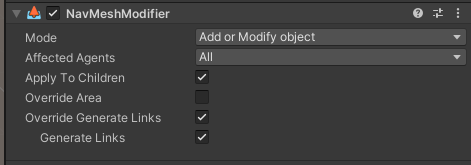
You need to configure it as shown in the screenshot.
Most moving enemies like Filth, Streetcleaners, Stalkers, and others will use the NavMesh to navigate so they know where to move and how to get to their destination. However, not all enemies behave like this.
Hideous Masses and Idols for example do not need one as they are stationary. Flying enemies like Virtues and Drones don't need one either, as they use collision of walls, floors and other geometry.
Afterwards, create a object named Navigation in the scene.

This object will need the component NavMeshSurface. Open Object Collection and change Collect Objects to NavMeshModifier Component Only and Use Geometry to Physics Colliders. Then you can finally click Bake and generate your navmesh.
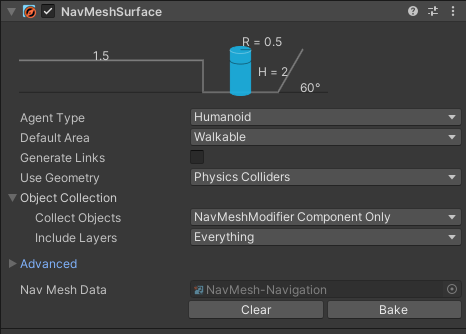
Make sure to hit Bake on the Navigation object EVERY TIME you have changed the level geometry and are about to export the level, otherwise, the paths of enemies will not be accurate to the geometry! Enemies might float, or clip into the ground, or refuse to enter certain rooms.
Congratulations! You have a working NavMesh!
There is an alternate way to do this. Instead of adding a NavMeshModifier to every floor you want to use, you can instead do the opposite and only add it to things you want the NavMesh to completely ignore when baking, like a trigger box. To do this, set the Collect Objects value in the Navigation object to All Game Objects, and then for any object you want to treat as not existing when baking, add a NavMeshModifier and set the Mode to Remove object.
It is up to you how you want to do the baking, and either of these strategies will work.